Nobody warns you about the second campaign. The first one is the funding push — the video, the launch-day scramble, the stretch goals. The second one starts the moment the timer hits zero: the messages.
Address changes. Reward swaps. "Can I still get the early-bird price?" And the big one, arriving on repeat for months: "When will my reward ship?"
If you're reading this mid-flood, this guide is the system we'd hand you: how Kickstarter's own messaging tools work (and where they stop), a triage framework that turns chaos into five predictable buckets, templates you can adapt tonight, and an honest look at when tools are worth it.
Why backer messages explode after the campaign ends
During the campaign, most communication is public — comments on your page, questions you answer once for everyone. After funding, it flips private. Three forces drive the flood:
- Money has changed hands. A backer who pledged $180 is no longer a curious browser; they're a customer with skin in the game. Every week of silence raises their pulse a little.
- Fulfillment is where plans meet reality. Tooling delays, freight surprises, a factory holiday you didn't know about. Every schedule change generates a wave of "so when is it actually coming?"
- Life happens to your backers too. People move house, change their minds, want to upgrade a pledge, or need a refund. Each of those is a private, personal conversation — and they arrive one at a time, forever.
None of this means your campaign is going badly. A busy inbox is what a funded project with real backers looks like. The problem isn't the questions — it's answering them one-by-one with no system.
Kickstarter's messaging tools — and where they stop
Kickstarter gives you three built-in channels, and it's worth knowing exactly what each can do:
- Direct messages. Backers can message you privately, and you can message any backer from their backer card in your backer report. These conversations also reach you as email notifications you can reply to directly — your emailed reply lands back in the backer's Kickstarter message thread.
- Bulk messages per reward tier. From the backer report, you can "Message All" backers of a specific tier — useful when one reward is delayed but others aren't. (See Kickstarter's own guide to communicating with backers.)
- Updates. Public posts to your project page, with the option to notify all backers or only certain tiers. Updates are your broadcast channel — the Kickstarter creator handbook treats them as the backbone of backer communication, and so should you.
What Kickstarter doesn't give you: a real support inbox. There are no reply templates, no ticket statuses, no way to mark a message "waiting on the factory," no shared queue if a partner helps you, and no connection between a backer's message and what they actually pledged — you look that up yourself, every time. For a 50-backer project that's fine. For 1,000+ backers in fulfillment, it's the reason your evenings disappear.
Triage first: the five buckets every campaign sees
Here's the liberating secret: backer messages feel infinite, but they're not even varied. Across almost every campaign, the overwhelming majority of messages fall into five buckets. Build a standard answer for each bucket and you've pre-answered most of your inbox.
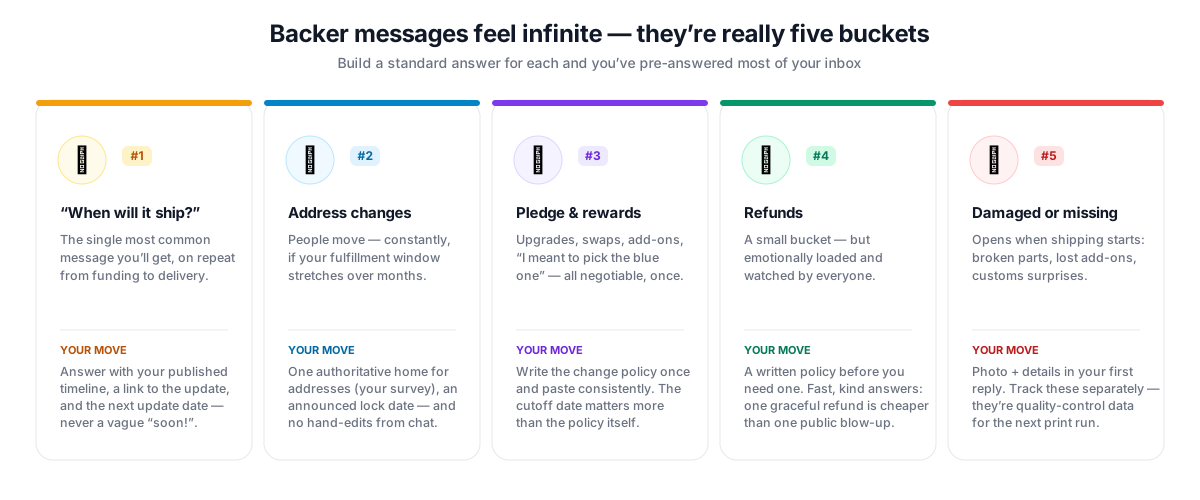
1. "When will my reward ship?"
The crowdfunding version of e-commerce's classic "where is my order?" — and the single most common message you'll receive, especially in the quiet stretch between campaign end and shipping.
Your move: never answer with vague reassurance ("soon!"). Answer with your last published timeline, a link to the update where you explained it, and the date of your next update. Anxious backers aren't asking for a miracle — they're checking whether anyone is at the wheel.
2. Address changes
People move. Lots of them, if your fulfillment window is long.
Your move: decide one authoritative place where addresses live — your pledge-manager survey if you use one (BackerKit, PledgeBox, and similar tools exist largely for this), or Kickstarter's own reward survey if you don't — and funnel every address message there. Never hand-edit addresses scattered across chat threads; that's how packages ship to old apartments.
3. Pledge and reward changes
Upgrades, downgrades, "can I add the expansion?", "I meant to pick the blue one."
Your move: write down your policy once — what's changeable, until when, and how — and paste it consistently. The cutoff matters more than the policy: the moment your fulfillment data goes to the warehouse, changes stop. Announce that date in an update before it arrives.
4. Refunds and cancellations
A small bucket, but emotionally loaded and legally real.
Your move: have a written refund policy before you need one — Kickstarter leaves post-campaign refunds largely to the creator, so backers genuinely don't know what to expect until you tell them. Answer fast, stay kind, and remember that a graceful refund costs you one pledge while a public blow-up costs you credibility with everyone watching.
5. Damaged, missing, or wrong rewards
The bucket that opens when shipping starts: broken parts, missing add-ons, customs surprises.
Your move: ask for a photo and the order details in your first reply (you'll need both anyway), state clearly what you'll do — replace, reship, refund — and track these separately from general questions. They're your quality-control data for reprints and future campaigns.
Templates that don't sound like templates
A template isn't about robotic replies — it's about not re-deciding your policy at 11pm. Write yours in your own voice, and personalize the first line every time. Three starting points:
Shipping timeline — Hi {name}, thanks for checking in! Current status: {stage — e.g. "units are on the water, arriving at our warehouse in early March"}. The full timeline is in Update #{n} ({link}), and I post progress every {cadence}. Next update lands around {date} — you won't need to chase me for news, promise.
Address change — Hi {name}, easy fix! The address we ship to comes from {survey tool}, so the safest way to update it is {exact steps/link}. Addresses lock on {date} when we send data to the warehouse — anytime before then is totally fine.
Damaged reward — Hi {name}, I'm really sorry your {item} arrived damaged — that's frustrating after the long wait. Could you send a photo of the damage and the packaging? Once I have it, I'll get a replacement moving right away. It shouldn't have arrived like that, and we'll make it right.
Notice the pattern: acknowledge, answer with specifics, state what happens next with a date. Specifics and dates are what separate a calming reply from a filler one.
The updates-first rule (answer once, not 400 times)
Here's the single highest-leverage habit for backer communication: every time you type the same answer twice, that answer belongs in an update.
A predictable update cadence — monthly is the widely accepted floor mid-fulfillment, more often when things are moving (our post-campaign playbook maps the full timeline) — does two jobs at once. It reassures the silent majority who would never message you but do quietly worry. And it gives you a link to send the vocal minority, which turns a ten-minute explanation into a ten-second reply.
The same logic builds your FAQ: keep a living document of your real answers to real questions — shipping timeline, address policy, change cutoff, refund policy, what to do about damage. That document becomes gold later, because it's exactly what any helper (human or AI) needs to answer the way you would.
When to bring in tools
Honest answer: below a few hundred backers, a template document, an update cadence, and discipline are probably all you need.
Beyond that, two tool categories do different jobs — and they complement rather than replace each other:
- Pledge managers (BackerKit, PledgeBox, and similar) handle the structured side: surveys, address collection, add-ons, charging for shipping. They dramatically shrink bucket #2 by giving backers a self-service place to fix their own address.
- Support tools handle the conversational side: the endless stream of individual questions that surveys can't absorb.
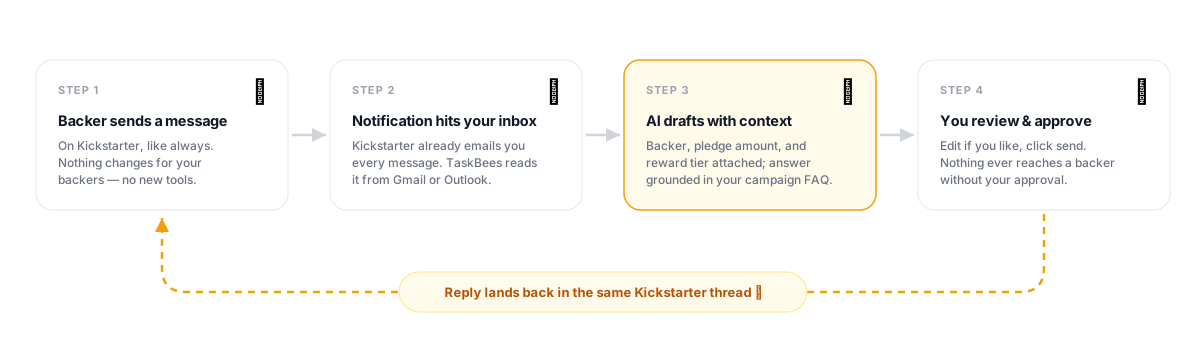
That second category is why we built TaskBees for Kickstarter creators. It reads the backer-message notifications that already land in your Gmail or Outlook, identifies the backer with their pledge amount and reward tier attached, and drafts a reply grounded in your FAQ and policies — in your voice, with the specifics filled in. You review, tweak if needed, and approve; the reply is delivered back into the backer's Kickstarter message thread, and nothing ever sends without you. No backer-list exports, ever — it works purely from the messages backers send you.
Whichever tools you pick, the system above comes first. Tools amplify a system; they can't replace one.
Common questions from creators
Can I bulk-message my Kickstarter backers?
Yes, per reward tier: your backer report has a "Message All" option for each tier. For anything that concerns everyone, post an update instead — it's public, permanent, and linkable, which private bulk messages are not.
How fast should I reply to backer messages?
Within one to two business days is a healthy target during fulfillment. Speed matters less than predictability: a backer who knows you post updates monthly and answer within two days rarely escalates. Silence is what escalates.
Do backers see my reply on Kickstarter or in their email?
Both. Kickstarter delivers messages to their inbox as notifications and keeps the thread in their Kickstarter account. That's also why replying through the thread (rather than starting fresh emails) matters — it keeps the conversation in one place backers trust.
What should I do about angry backers?
Reply fast, acknowledge the frustration before defending anything, give concrete status with a date, and take heated threads private. Most anger in crowdfunding is fear wearing a costume — fear that the project is dead and the money is gone. Specifics and dates treat the fear; arguing treats only the costume. We wrote a full guide with copy-paste scripts: Angry Kickstarter backers: de-escalation scripts that actually work.
The flood is survivable — thousands of creators cross it every year. Triage into buckets, template your policies, publish updates before people have to ask, and get help (human or otherwise) once the volume outgrows your evenings. Your backers don't expect perfection. They expect to be answered.